
安装拼音分词器
查看ES安装与使用下面的拼音分词器安装
自定义分词器
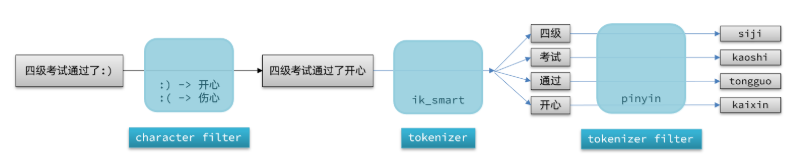
elasticsearch中分词器(analyzer)的组成包含三部分:
- character filters:在tokenizer之前对文本进行处理。例如删除字符、替换字符
- tokenizer:将文本按照一定的规则切割成词条(term)。例如keyword,就是不分词;还有ik_smart
- tokenizer filter:将tokenizer输出的词条做进一步处理。例如大小写转换、同义词处理、拼音处理等
测试
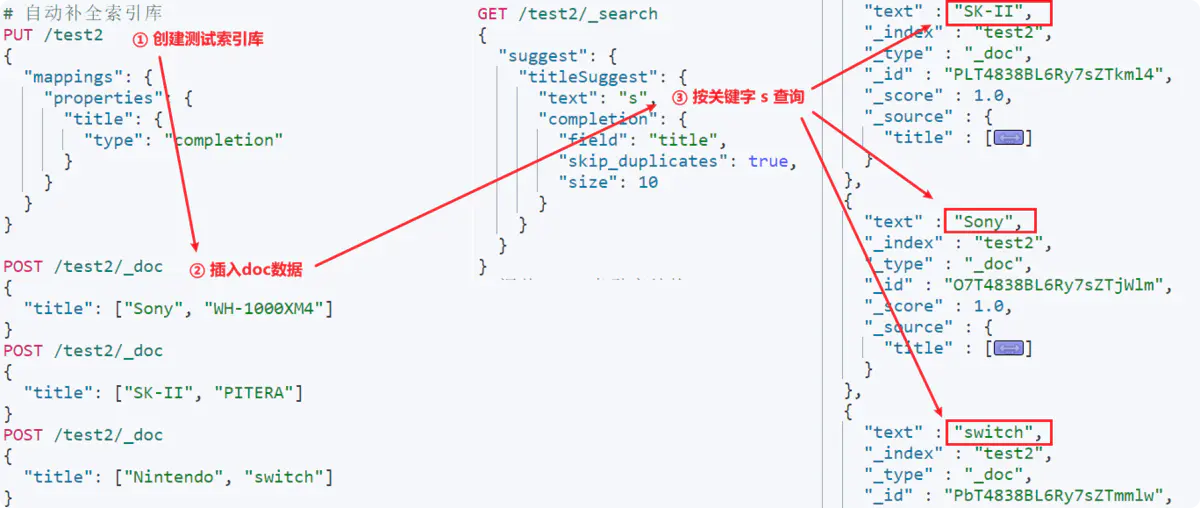
    PUT /test2
          {
            "mappings": {
              "properties": {
                "title": {
                  "type": "completion"
                }
              }
            }
          }
        POST /test2/_doc
        {
          "title": ["Sony", "WH-1000XM4"]
        }
        POST /test2/_doc
        {
          "title": ["SK-II", "PITERA"]
        }
        POST /test2/_doc
        {
          "title": ["Nintendo", "switch"  ]
        }
        GET /test2/_search
        {
          "suggest": {
            "titleSuggest": {
              "text": "s", //查询的关键字
              "completion": {
                "field": "title", //补全查询的字段
                "skip_duplicates": true, //跳过重复数据
                "size": 10 //获取前10条结果
              }
            }
          }
        }
自定义
结合ik_smart自定义分词器的语法如下:
  PUT /test
          {
            "settings": {
              "analysis": {
                "analyzer": { // 自定义分词器
                  "my_analyzer": {  // 分词器名称
                    "tokenizer": "ik_max_word",
                    "filter": "py"
                  }
                },
                "filter": { // 自定义tokenizer filter
                  "py": { // 过滤器名称
                    "type": "pinyin", // 过滤器类型,这里是pinyin
                    "keep_full_pinyin": false,
                    "keep_joined_full_pinyin": true,
                    "keep_original": true,
                    "limit_first_letter_length": 16,
                    "remove_duplicated_term": true,
                    "none_chinese_pinyin_tokenize": false
                  }
                }
              }
            },
            "mappings": {
              "properties": {
                "name": {
                  "type": "text",
                  "analyzer": "my_analyzer",
                  "search_analyzer": "ik_smart"
                }
              }
            }
          }
RestClient使用
修改es的mapping映射
DELETE /hotel
# 酒店数据索引库
PUT /hotel
{
  "settings": {
    "analysis": {
      "analyzer": {
        "text_analyzer": {
          "tokenizer": "ik_max_word",
          "filter": "py"
        },
        "completion_analyzer": {
          "tokenizer": "keyword",
          "filter": "py"
        }
      },
      "filter": {
        "py": {
          "type": "pinyin",
          "keep_full_pinyin": false,
          "keep_joined_full_pinyin": true,
          "keep_original": true,
          "limit_first_letter_length": 16,
          "remove_duplicated_term": true,
          "none_chinese_pinyin_tokenize": false
        }
      }
    }
  },
  "mappings": {
    "properties": {
      "id": {
        "type": "keyword"
      },
      "name": {
        "type": "text",
        "analyzer": "text_analyzer",
        "search_analyzer": "ik_smart",
        "copy_to": "all"
      },
      "address": {
        "type": "keyword",
        "index": false
      },
      "price": {
        "type": "integer"
      },
      "score": {
        "type": "integer"
      },
      "brand": {
        "type": "keyword",
        "copy_to": "all"
      },
      "city": {
        "type": "keyword",
        "copy_to": "all"
      },
      "starName": {
        "type": "keyword"
      },
      "business": {
        "type": "keyword",
        "copy_to": "all"
      },
      "location": {
        "type": "geo_point"
      },
      "pic": {
        "type": "keyword",
        "index": false
      },
      "all": {
        "type": "text",
        "analyzer": "text_analyzer",
        "search_analyzer": "ik_smart"
      },
      "suggestion":{
        "type": "completion",
        "analyzer": "completion_analyzer"
      }
    }
  }
}
实现
改造实体类
@Data
@NoArgsConstructor
public class HotelDoc {
    private Long id;
    private String name;
    private String address;
    private Integer price;
    private Integer score;
    private String brand;
    private String city;
    private String starName;
    private String business;
    private String location;
    private String pic;

    // 排序时的 距离值
    private Object distance;

    private Boolean isAD;

    /**
     * 新增自动补全字段
     *
     * @param hotel
     */
    private List<String> suggestion;
    public HotelDoc(Hotel hotel) {
        this.id = hotel.getId();
        this.name = hotel.getName();
        this.address = hotel.getAddress();
        this.price = hotel.getPrice();
        this.score = hotel.getScore();
        this.brand = hotel.getBrand();
        this.city = hotel.getCity();
        this.starName = hotel.getStarName();
        this.business = hotel.getBusiness();
        this.location = hotel.getLatitude() + ", " + hotel.getLongitude();
        this.pic = hotel.getPic();
        if (this.business.contains("/")) {
            String[] arr = this.business.split("/");
            this.suggestion = new ArrayList<>();
            this.suggestion.add(this.brand);
            Collections.addAll(this.suggestion, arr);
        } else {
            this.suggestion = Arrays.asList(this.brand, this.business);

        }

    }
}
批量导入
  /**
     * 批量添加数据
     */
    @Test
    void testBulkRequest() throws IOException {
        List<Hotel> hotels = hotelService.list();

        BulkRequest bulkRequest = new BulkRequest();

        for (Hotel hotel : hotels) {
            HotelDoc hotelDoc = new HotelDoc(hotel);

            bulkRequest.add(new IndexRequest("hotel")
                    .source(JSONUtil.toJsonStr(hotelDoc),XContentType.JSON));
        }

        client.bulk(bulkRequest,RequestOptions.DEFAULT);
    }
查询与响应
 @Test
    public void testSuggest() throws IOException {
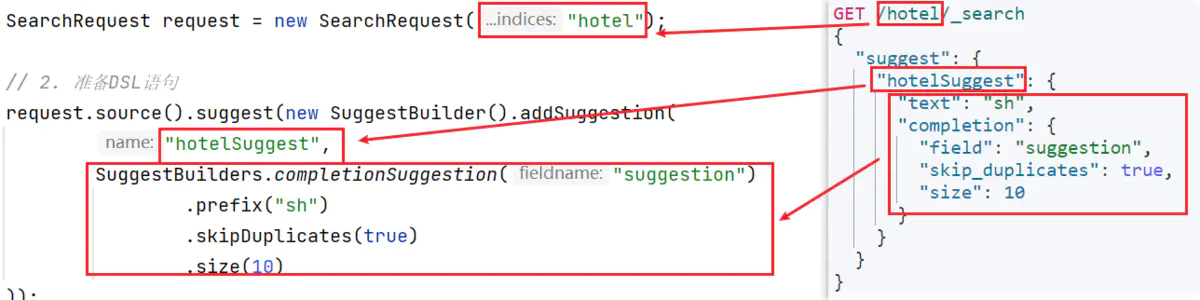
        SearchRequest request = new SearchRequest("hotel");

        request.source().suggest(new SuggestBuilder().addSuggestion("suggestions",
                SuggestBuilders.completionSuggestion("suggestion")
                .prefix("sh")
                .skipDuplicates(true)
                .size(10)

        ));
        SearchResponse response = client.search(request, RequestOptions.DEFAULT);

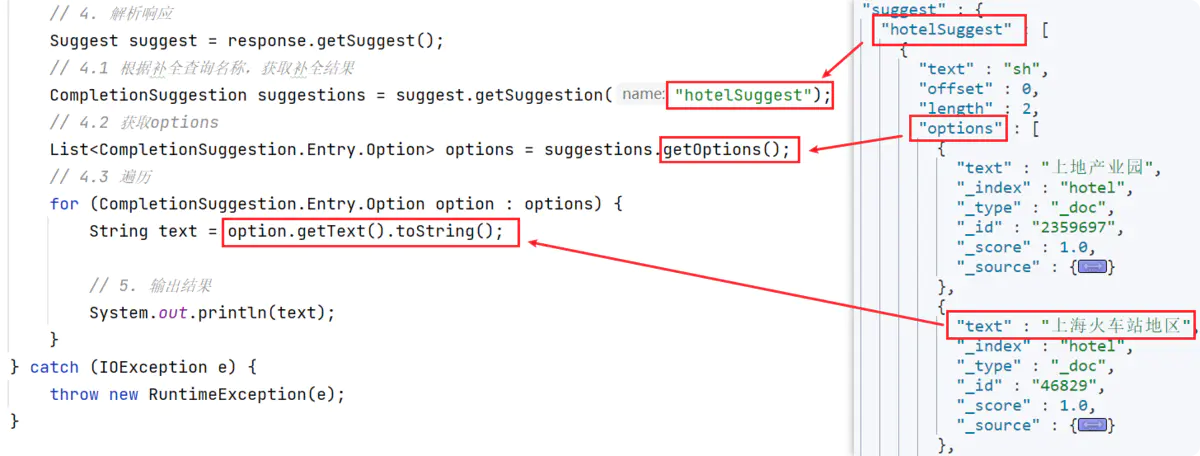
        Suggest suggest = response.getSuggest();
        CompletionSuggestion suggestions = suggest.getSuggestion("suggestions");

        List<CompletionSuggestion.Entry.Option> options = suggestions.getOptions();
        for (CompletionSuggestion.Entry.Option option : options) {
            String text = option.getText().toString();
            System.out.println(text);
        }

    }
评论区